
Partition Key and Sort Key in DynamoDb
DynamoDB Overview
DynamoDB, a fully managed NoSQL database service by Amazon Web Services (AWS), is designed for horizontal scalability—it can add more nodes, or “partitions,” as data volume increases. To illustrate, imagine a library where, as more books arrive, instead of cramming them onto one shelf, you add more shelves. This makes Dynamodb well suited for high-traffic environments.
Partition Key
Since DynamoDB is a distributed database, it uses multiple nodes to store data. The partition key is an identifier that determines which node the data will reside on.
A hash function (a black box that performs complex math) is applied to the partition key to select the node where the data will be stored. For example, if the partition key is 1234 and hash(1234) = 4, the entries for partition key 1234 will be stored in node 4. The hash function will always produce the same output for a given key.
If a table contains both a partition key and a sort key, the partition key does not have to be unique (but the combination of the partition key and sort key must be unique). However, if the table does not have a sort key, the partition key must be a unique identifier.
Best Practices for Choosing the Partition Key
- Ensure High Cardinality: The partition key should have a large number of distinct values to distribute items evenly across partitions. Usually IDs make good partition keys.
- Consider Access Patterns: Choose a partition key based on how the data will be queried, ensuring frequent queries can leverage the partition key for efficiency.
- Use Composite Keys for Flexibility: While DynamoDB doesn’t support composite partition keys natively, you can create a composite key by concatenating multiple attributes into a single string, just ensure it maintains high cardinality.
- Mitigate Hot Partitions: Use techniques like random suffixes or sharding if certain partition keys receive too much traffic(Let’s discuss those later)
Sort Key
The sort key, also known as the range key, organizes data within a partition in a sorted order, enabling efficient range queries.
Best Practices for Choosing the Sort Key
- Use Sort Key for Range Queries: Sort keys are helpful for retrieving items in chronological or alphabetical order. If an attribute is more likely to be searched in ascending/descending order, then it would make more sense to use it as a sort key.
- Ensure Uniqueness: The combination of partition key and sort key should be unique for each item to avoid data duplication (This is very important).
- Optimize for Query Performance: Choose a sort key that aligns with frequent query patterns, ensuring efficient data retrieval.
Example
Let’s consider a DynamoDB table for a library system with the following schema:
- Partition Key (PK): AuthorID
- Sort Key (SK): BookTitle
- Attributes: PublicationDate, Genre
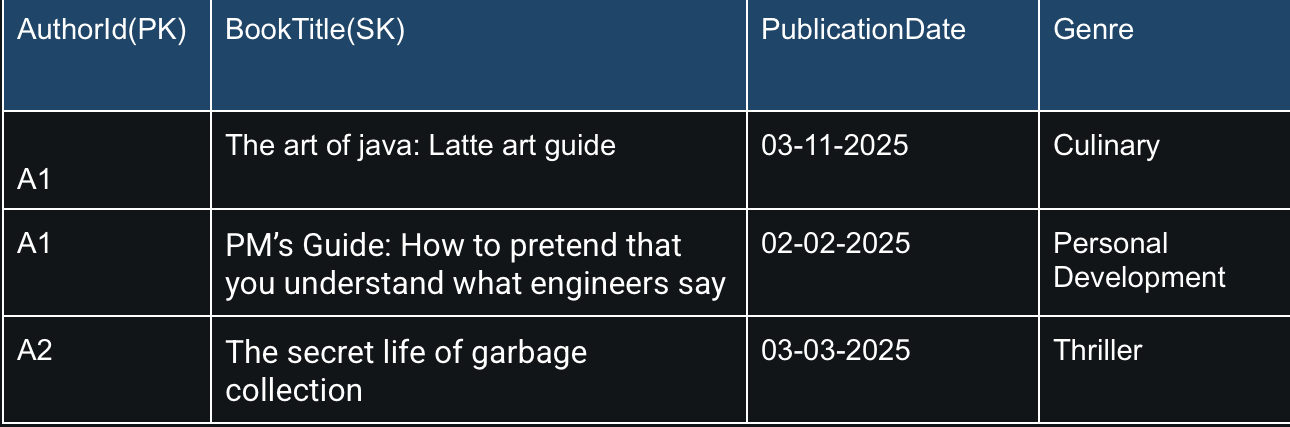
- Say suppose,
hash(A1) = 9, then all the A1 entries (for book titles - “The art of java: Latte art guide” and “PM’s Guide: How to pretend that you understand what engineers say”) will be stored in partition#9. This setup allows efficient queries such as fetching all books by AuthorID A1. - Queries to find a specific book like “The art of java: Latte art guide” by AuthorID A1, or listing books in alphabetical order for AuthorID A1 leverage the partition key for distribution and the sort key for ordering, typically achieving O(1) complexity for lookups.
- But if queries often need books by publication date, PublicationDate could be a better sort key than BookTitle.
Pros and Cons of Partition Key and Sort Key
Pros
- Fast and Efficient Retrieval: Often O(1) for partition key-based queries.
- Easy to Scale the Database: Since we can add more partitions if needed.
- Logical Grouping of Related Data: Enhancing query performance.
- Optimized for Range-Based Queries: Using the sort key, such as getting items in order.
Cons
- Limited Query Flexibility: As queries must use the partition key—In DynamoDB, the primary key (partition key and sort key) should be designed to support the most frequent and critical queries. For less frequent queries that don’t align with the primary key, you might need to use additional mechanisms like caching or batch processing. Alternatively, you can denormalize data or create separate tables optimized for different query patterns or use Global secondary Indexes (GSIs).
- Risk of Hot Partitions: Let’s discuss this further! This is one of the common discussion topics in system design interviews.
Hot Partitions: Challenges and Solutions
A hot partition occurs when a particular partition receives a disproportionate amount of read or write traffic, potentially leading to throttling and reduced performance. I like to think of it as a kid who’s chosen to be the team captain for every sport—while it’s a great honor, they’re now getting bombarded with requests and might just get benched by performance issues! Hot partition is a common challenge, especially for applications with uneven data access patterns. In the library example, if AuthorID “J.K. Rowling” has millions of books, that partition could become a bottleneck.
Strategies for Mitigating Hot Partitions
Mitigating hot partitions involves ensuring data is distributed evenly across partitions to balance the load. Here are detailed strategies based on AWS best practices:
- Choose a Partition Key with High Cardinality
- Monitor and Adjust: Regularly monitor partition usage using CloudWatch metrics to identify hot partitions and preemptively adjust the partition key design if necessary.
- Leverage DynamoDB Features: DynamoDB has adaptive capacity, which automatically adjusts capacity for hot partitions to handle bursts of traffic. However, it has its limitation—Even with adaptive capacity, a single partition is limited to 3000 read operations or more than 1000 write operations.
- Sharding: For partition keys expected to have high traffic, append a random suffix or shard identifier to create multiple partitions. For instance, instead of using AuthorID as the partition key, use AuthorID#shard_number, where shard_number could be a random number from 0 to 9. This technique, often called write sharding, distributes the load across multiple partitions. For example, if author A1 has many books, you could have A1#0, A1#1, etc., each holding a portion of the books.
Now, let’s talk about how we can query data after sharding:
- Maintain a list of shards associated with the key: Know all possible shard identifiers for a given logical key. We can even consider having another table with AuthorID as the partition key and ShardNumber as the sort key, containing the shard details.
- Use Asynchronous Requests: Query multiple shards simultaneously.
- Combine the Results: After all queries complete.
Let’s use the same example but this time with sharded partition keys:
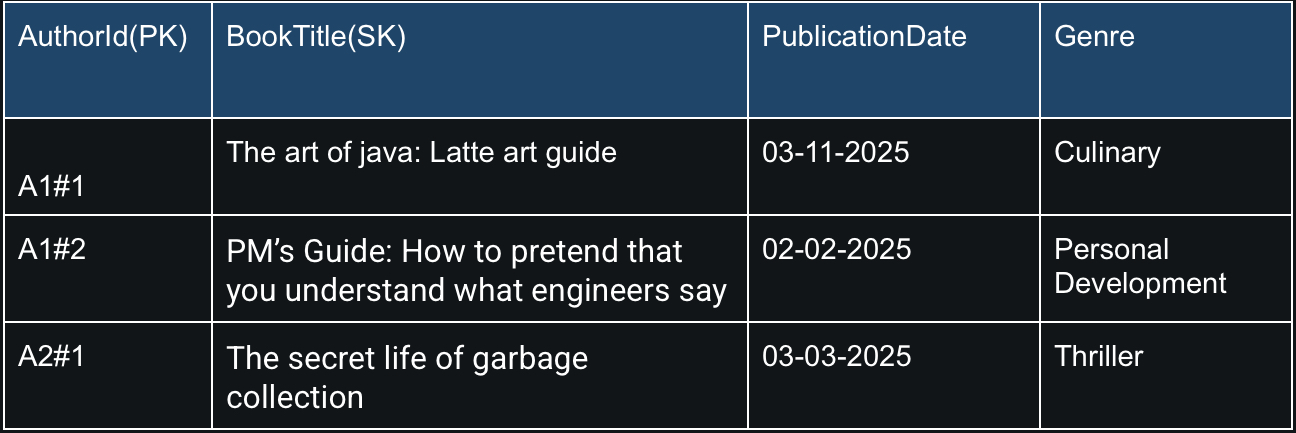
To query all books by author A1, you would:
- Know the shards are A1#0 to A1#9 (assuming 10 shards).
- Send parallel queries for each, e.g., Query with KeyConditionExpression: PK = ‘A1#0’ and similarly for A1#1 to A1#9.
- Combine the results to get all books by A1.
Conclusion
Partition keys and sort keys are foundational to DynamoDB’s efficient data management, ensuring data is distributed and organized for optimal performance. Remember, if your data starts acting like a Voldemort, demanding all the attention, just shard it, because one partition wasn’t enough to handle all the drama.