
TLS/SLS Handshake
Imagine you’re in a bustling coffee shop, about to share your juiciest secrets with a friend. You wouldn’t just blurt them out for everyone to hear, right? You’d lean in close, maybe whisper, or find a quiet corner to chat privately. On the internet, SSL/TLS is that quiet corner—it ensures your conversations with websites stay secure and confidential. Whether you’re shopping online, logging into your bank, or just browsing cat memes, SSL/TLS is the hero keeping your data safe.
But how does it work? At the heart of this security magic is the SSL/TLS handshake, a behind-the-scenes ritual that sets up a secure connection between your browser (the client) and a website’s server. In this blog post,we’ll understand how it works and explore why this handshake matters in system design interviews. Let’s dive into the secret handshake that powers the secure internet!
What Are SSL and TLS?
SSL (Secure Sockets Layer) and TLS (Transport Layer Security) are cryptographic protocols designed to provide secure communication over a network. TLS is the successor to SSL and offers improved security, efficiency, and encryption techniques. Although people still refer to “SSL certificates,” modern web security primarily relies on TLS.
Key Differences:
- SSL (1995 - Deprecated): Older versions had vulnerabilities and are no longer considered secure.
- TLS (1999 - Present): TLS 1.2 and TLS 1.3 are widely used today, providing stronger encryption and better performance.
How the SSL/TLS Handshake Works
Think of the SSL/TLS handshake as two strangers—your browser and a server—meeting for the first time and figuring out how to trust each other.
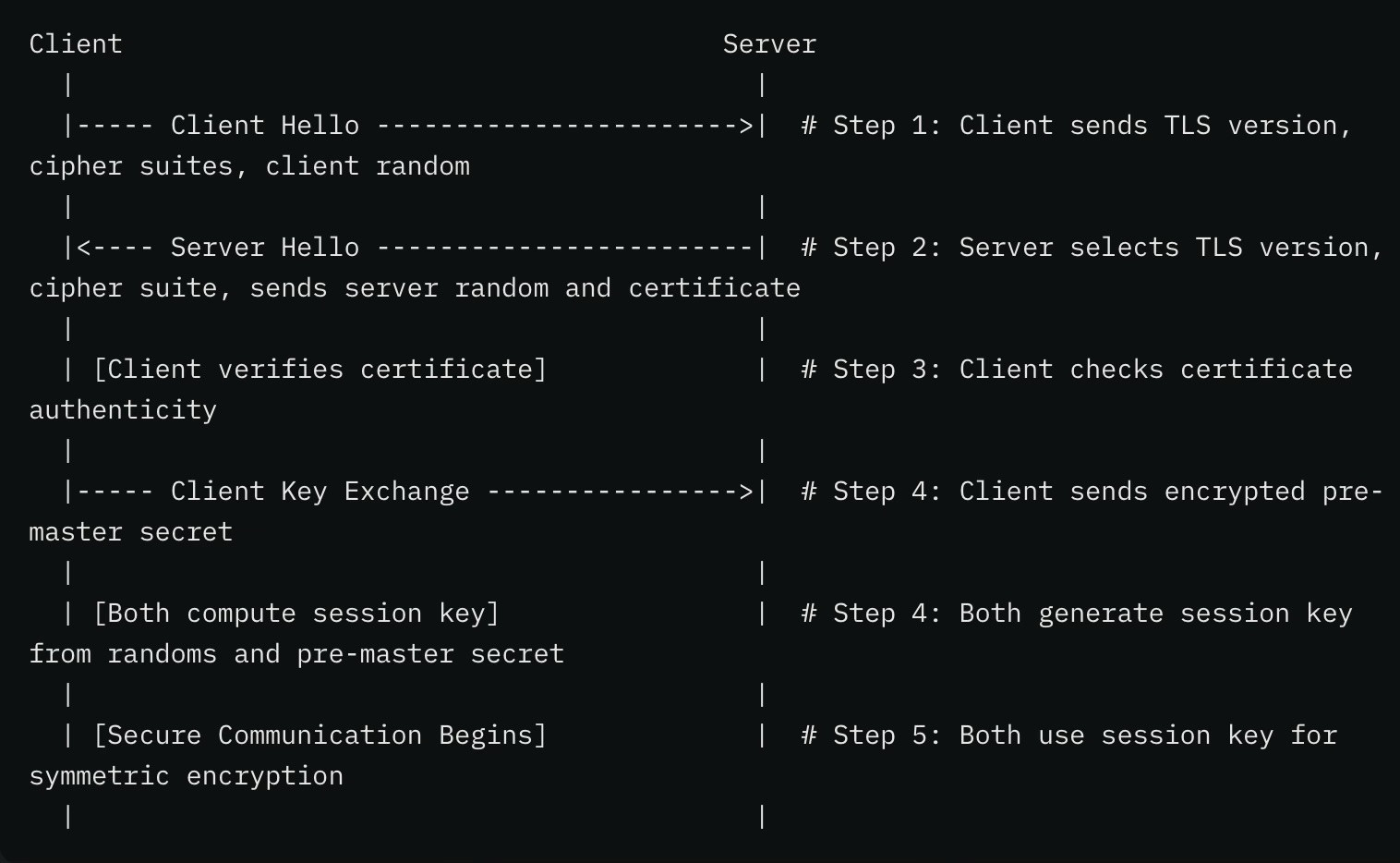
Step 1: Client Hello
The client starts the handshake by sending a “Client Hello” message to the server.
What’s Included:
- The highest TLS version it supports (e.g., TLS 1.3).
- A list of cipher suites combinations of
- encryption algorithms for key exchange (e.g., RSA, ECDHE)
- symmetric encryption (e.g., AES)
- hashing (e.g., SHA-256).
- A random byte string called the client random, used later to generate the shared key.
Encryption Example:
- The “Client Hello” itself isn’t encrypted because it’s the first message, and no keys have been established yet. However, it proposes encryption methods.
- Example: The client might say, “I support TLS 1.3 with cipher suite
TLS_AES_256_GCM_SHA384(AES-256 for encryption, SHA-384 for integrity, and ECDHE for key exchange). Here’s my client random: 123456789.”
Step 2: Server Hello
The server replies with a “Server Hello” message, choosing the best options from the client’s list.
What’s Included:
- The agreed-upon TLS version and cipher suite.
- A server random byte string.
- The server’s SSL certificate, which includes its public key and is signed by a trusted Certificate Authority (CA).
Example:
- Server: “I’ll go with TLS 1.3 and
TLS_AES_256_GCM_SHA384. Here’s my server random: 987654321, and my SSL certificate with public key XYZ.”
Step 3: Certificate Verification
The client checks the server’s SSL certificate to confirm its authenticity.
How It Works:
- The client verifies that the certificate is signed by a trusted CA (e.g., Let’s Encrypt, DigiCert).
- It ensures the certificate isn’t expired and matches the server’s domain (e.g., example.com).
Example:
- Client: “This certificate is for example.com, signed by Let’s Encrypt, and valid until 2024. The public key is XYZ. Looks legit!”
Step 4: Key Exchange
The client and server agree on a shared secret key for symmetric encryption.
How It’s Done:
- The client generates a pre-master secret, encrypts it with the server’s public key (from the certificate), and sends it.
- The server decrypts it with its private key.
- Both combine the client random, server random, and pre-master secret to compute the same session key.
Example:
- Client: “I’ve generated a pre-master secret: 456789. I’ll encrypt it with the server’s public key XYZ and send it.”
- Server: “Decrypting with my private key… I’ve got 456789.”
- Both: “Using client random (123456789), server random (987654321), and pre-master secret (456789), we calculate the session key: ABC123.”
Step 5: Secure Communication
With the session key established, both sides use symmetric encryption (e.g., AES-256) to encrypt and decrypt data.
Example:
- Client: “Encrypting ‘Hello, server!’ with session key ABC123.”
- Server: “Decrypting with ABC123… I see ‘Hello, server!’”
What’s an SSL Certificate?
Definition: An SSL certificate is a digital document that ties a domain name (e.g., example.com) to a public key. It’s issued by a trusted Certificate Authority (CA) and proves the server’s identity. Contents: Includes the domain name, the server’s public key, the CA’s signature, and validity dates. Purpose: Ensures the client is talking to the real server, not an impostor. Example: When you visit https://example.com, your browser checks the SSL certificate to confirm it’s valid and matches example.com.
What’s a Public Key?
Definition: A public key is one half of an asymmetric encryption key pair (the other being the private key). It’s shared openly via the SSL certificate. Role: Used to encrypt data that only the server’s private key can decrypt, or to verify signatures.
When to Discuss SSL/TLS Handshakes in System Design Interviews
Now, let’s switch gears and talk about why it’s a must-know for system design interviews, especially if you’re aiming for backend or full-stack roles. When you’re designing a system—like an e-commerce platform or a social network—security isn’t optional. It’s table stakes.
Designing Secure APIs
If you’re asked about securing REST or GraphQL APIs, emphasize the importance of HTTPS (which uses TLS) to protect data from man-in-the-middle attacks.
Example: If designing a banking API, explain how TLS ensures secure transmission of sensitive information, such as login credentials and transactions. You can mention that you would enforce HTTPS with TLS 1.3 for encryption, use strong cipher suites, and monitor certificate expiry to keep the API secure. Be ready to discuss managing certificates—how you’d renew them, choose trusted CAs, and avoid browser warnings. Pro tip: Mention tools like Let’s Encrypt for automation.
Load Balancing & Reverse Proxies
When discussing architecture involving Nginx, HAProxy, or a cloud load balancer, mention TLS termination—a process that offloads the decryption workload from backend services, reducing processing overhead. The load balancer or reverse proxy decrypts incoming TLS traffic and sends plaintext requests to internal servers, improving efficiency.
Example: If you’re designing a system for a high-traffic website, explain how TLS termination reduces processing overhead on backend servers while keeping traffic encrypted up to the load balancer.
Authentication Systems
When designing an authentication flow (OAuth, JWT, or SSO), mention how TLS prevents token interception and replay attacks. Without encryption, attackers can intercept authentication tokens (such as JWTs) over the network and reuse them to gain unauthorized access (a replay attack). TLS encrypts token exchanges, making it impossible for attackers to read or reuse intercepted tokens.
Example: If discussing user authentication for a SaaS application, explain how TLS encrypts login requests to prevent password sniffing and ensures token confidentiality.
Distributed Systems & Microservices
If designing a system with multiple services communicating internally, mention mutual TLS (mTLS) for verifying both client and server identities. Unlike standard TLS (where only the client verifies the server’s identity), mTLS ensures both parties authenticate each other before exchanging data. This is useful in zero-trust architectures, preventing unauthorized services from accessing sensitive APIs.
Example: In a microservices-based architecture (e.g., Kubernetes or Istio), mutual TLS ensures that only authorized services communicate with each other, reducing the risk of service impersonation.
WebSockets & Real-Time Communication
If discussing WebSockets for real-time applications (like chat apps), explain that secure WebSockets rely on TLS to encrypt persistent connections.
Example: If designing a financial trading platform, secure WebSockets ensure stock price updates remain confidential and tamper-proof.
Cloud Security & Compliance
Regulations like GDPR and HIPAA mandate protecting sensitive user data, including healthcare records and personal identifiable information (PII). Data in transit is especially vulnerable to interception by attackers and requires encrypting data in transit. TLS plays a critical role in meeting these requirements. TLS encrypts all data traveling between clients and servers, preventing unauthorized access and ensuring compliance with regulations.
Example: If designing a healthcare application, explain how TLS encryption ensures HIPAA compliance by securing electronic health records (EHRs) as they travel over the network.
Conclusion
Next time you’re in a system design interview, don’t just say “use HTTPS.” Explain why it’s needed, how TLS works, and where it fits into secure architectures.
Happy coding and stay secure!